Sometimes you just want to spin up Isadora on your laptop without subscription (hence without the ability to save project, or even User Actor/Macros), so you can get some scripted lines onto the screen. Here’s an example usage of maximizing the Javascript actor, and minimizing the Isadora Actors required to throw up a teleprompter that take a text file of the script!
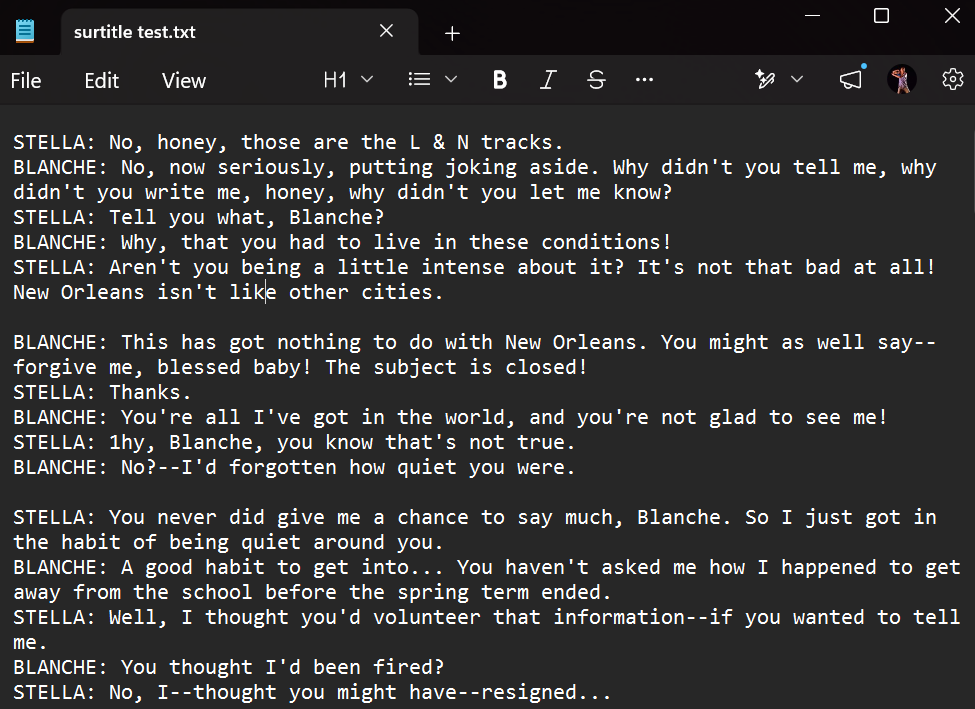
To begin, copy and paste the script into a text file (.txt), and breaking the script up into five line chunk (we’ll consider this our “page”), each line following the format of:
[character name]: [dialogue]
Something like this:
Moving into Isadora, here’s the setup:
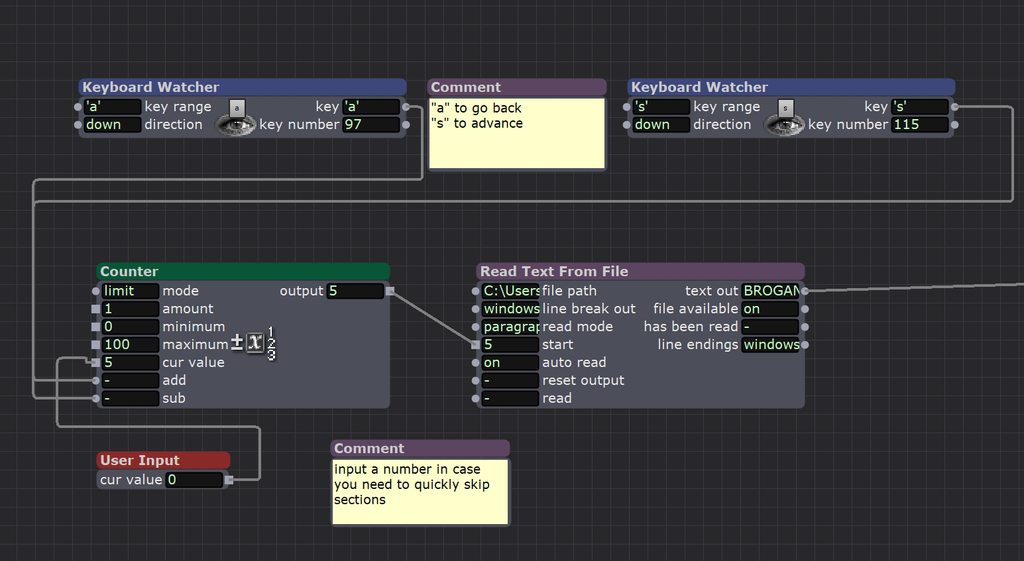
- Two Keyboard Watchers into a counter to toggle to page number / aka chunk number.
- A User Input actor where we can type in an integer to quick jump to the section we want to see.
- Read Text From File to locate the .txt file which is the prepared script.
- “Read mode” shuold be “paragraph”
- “auto read” to on.
- so that it’ll pick up five lines at a time which was how we divided it up.
- the Text Out will connect to a Javascript Actor…..
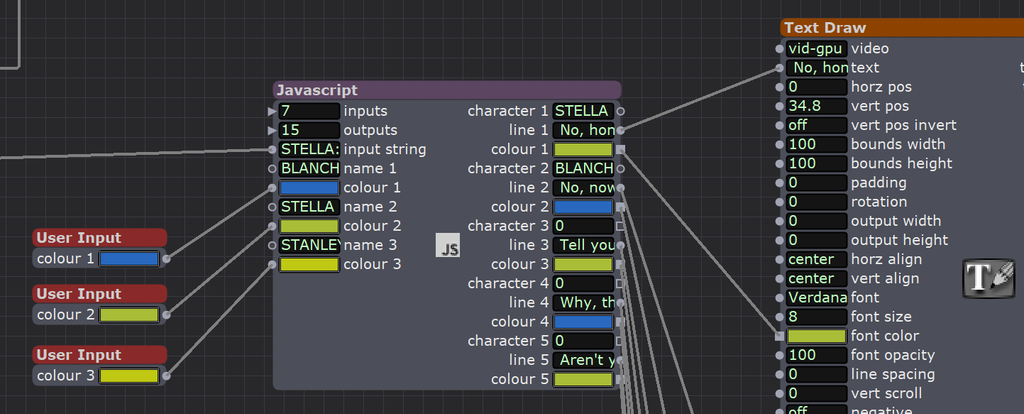
For this example let’s select the number of inputs to 7 and outputs to 15 on the upper left side of this actor, then double click on the Javascript Actor to open up the code editor, and add the following code:
// iz_input 1 "input string"
// iz_input 2 "name 1"
// iz_input 3 "colour 1"
// iz_input 4 "name 2"
// iz_input 5 "colour 2"
// iz_input 6 "name 3"
// iz_input 7 "colour 3"
// iz_output 1 "character 1"
// iz_output 2 "line 1"
// iz_output 3 "colour 1"
// iz_output 4 "character 2"
// iz_output 5 "line 2"
// iz_output 6 "colour 2"
// iz_output 7 "character 3"
// iz_output 8 "line 3"
// iz_output 9 "colour 3"
// iz_output 10 "character 4"
// iz_output 11 "line 4"
// iz_output 12 "colour 4"
// iz_output 13 "character 5"
// iz_output 14 "line 5"
// iz_output 15 "colour 5"


function main()
{
	var inputText = arguments[0].toString();
	var allLines = inputText.split(/\r?\n/, 5)

	var characters= [];
	var lines= [];
	var colours= [];

	var char1 = [arguments[1].toString(), arguments[2]];
	var char2 = [arguments[3].toString(), arguments[4]];
	var char3 = [arguments[5].toString(), arguments[6]];

	for (var eachLine of allLines) {
// using rest operator (...) otherwise .split() would just discard the rset of the line
		var [character, ...line] = eachLine.split(":");
		switch (character) {
  			case char1[0]:
    			var textColour= char1[1];
    			break;
  			case char2[0]:
				var textColour= char2[1];
				break;
			case char3[0]:
				var textColour= char3[1];
				break;
  			default:
   		 	var textColour= '000000'
			}
		characters.push(character), lines.push(line.join('')), colours.push(textColour);
	}

	var finalArray = [];
	for (let i = 0; i < 5; i++) {
 	 finalArray.push(characters[i]);
 	 finalArray.push(lines[i]);
 	 finalArray.push(colours[i]);
 	 ;
	}

	return finalArray
}(View as as a Github Gist)
- For the inputs, the way we tell the Javascript actor what to accept is by connecting something of that type to it.
- Add an User Input, double click and change the type String to connect to the three name inputs so that they change to text input. Type in the User Input so they update.
- Disconnect the User Input and change it to color and connecte it all to the three color inputs. Change the color (make sure the Alpha at the right hand side is set to max) so the colors update. Then you can delete the User Input and edit directly on the Javascript Actor.
- This is us giving the parameter of the character name that we’ll use to parse the script text with. And choosing a font colour we want each character’s lines to be displayed in.
- If we want to add more characters, it just involves adding more inputs and adding more cases in the Switch/Case logic in Javascript.
- if you want to hard-code the colour input, the Text Draw actor takes a 32 bit integer input, so use this converter:
https://color-converter-tool.web.app/
- Similarly for the outputs, we’ll have to force the output type into string / color.
- Create five Text Draw actors, each connecting to their own Projector output.
- Each of the five lines will connect the text input and the font color of a Text Draw. You’ll want to manually adjust the vertical position (“ver pos”) of each Text Draw separately so five lines are spaced out evenly.
- For chunkier lines, you may want to only have three lines displayed per page. In that case the in-between lines you can just put any random text/character to take up the space of a line – as long as it’s not an empty line / line break.
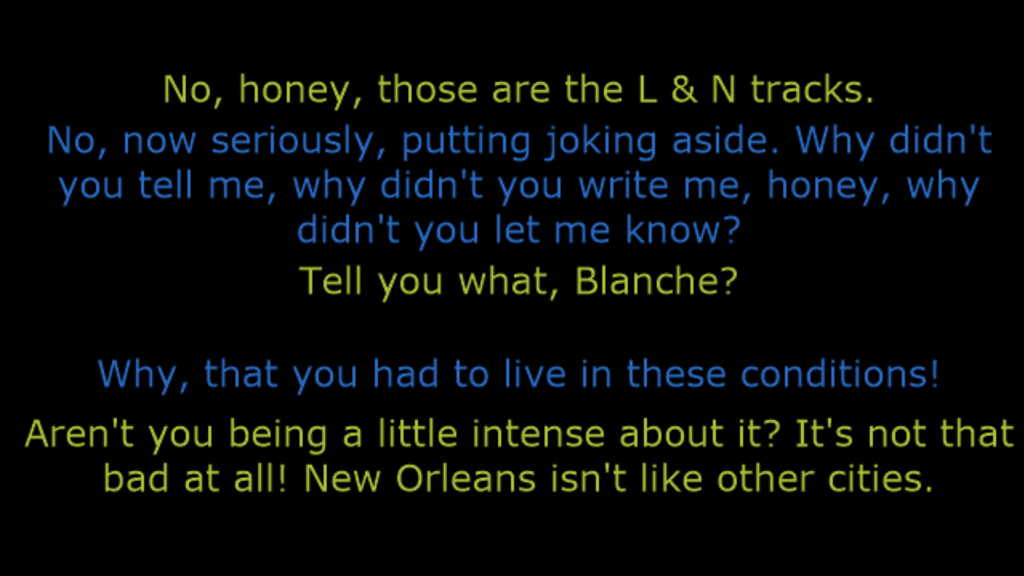
And ta-da, it’ll look something like this!
🙂
See also: if you wanna do some line by line surtitling, with the ability to specify the text location and colour based on character, here’s a tutorial.
2 thoughts on “Isadora for script teleprompting”